



| 82%of diners prefer contactless checkout | 3×faster than cash transactions | 67%of restaurants saw higher tips after adoption | $12B+in projected NFC restaurant volume (2025) |
The $20 Bill That Changed Everything
Picture this: It’s a Saturday night. Your dining room is packed, every table buzzing. A couple at table seven signals for their check. The server drops it off, and the man reaches into his pocket — then pauses, pats himself down, and quietly tells his partner he forgot his wallet. She pulls out her phone and taps it against the card reader in under three seconds. Done. No fumbling. No awkward wait. They’re back to their dessert before the receipt finishes printing.
That moment — brief, almost invisible — is exactly what contactless payment technology was built for. And for restaurant owners in 2025, it’s no longer a nice-to-have feature. It’s the baseline expectation.
This guide breaks down everything you need to know about contactless payments: how the technology works, what it actually costs, which system is right for your operation, and the honest tradeoffs that no vendor brochure will tell you.
What Are Contactless Payments — Really?
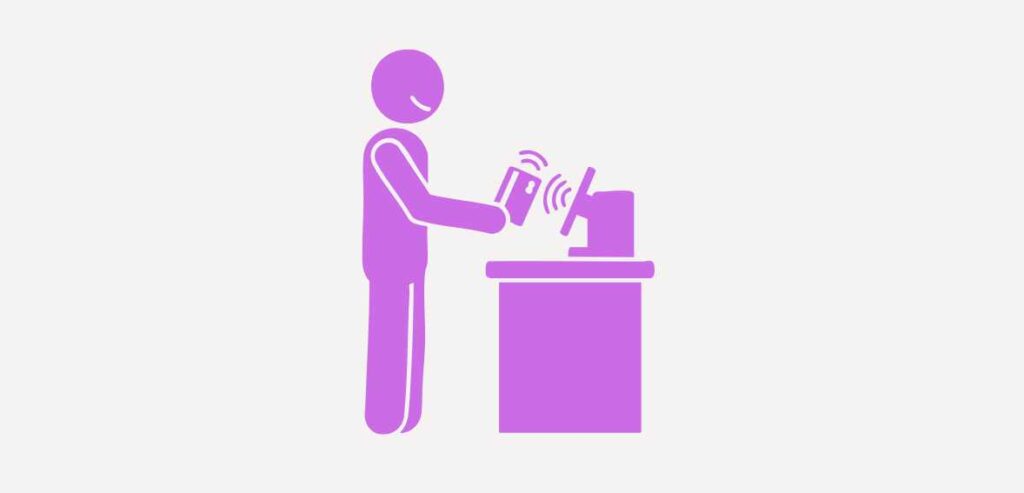
Contactless payments let customers complete a transaction by holding a card, smartphone, or wearable device near a payment terminal — no card swipe, no PIN entry (for smaller amounts), and no physical handoff required. The technology underpinning all of it falls into two main categories.
Near-Field Communication (NFC)
NFC is the workhorse of contactless payments. It operates on a 13.56 MHz frequency and works within a few centimeters of the reader. Every time a customer uses Apple Pay, Google Pay, or a contactless Visa or Mastercard, they’re using NFC. The chip in the card — or the chip in the phone — communicates with the terminal in a single encrypted burst, typically completing in under half a second.
QR Code Payments
QR codes took a leap forward during the pandemic when restaurants needed no-touch menus and payments fast. With QR-based systems, customers scan a code (printed on a table tent, receipt, or displayed on a screen), which takes them to a payment portal in their browser. No app required. Systems like Toast, Square, and Zuppler have built robust QR payment flows that integrate directly with your POS.
| 💡 Quick Take NFC is faster and more seamless at the counter; QR codes shine for tableside pay-at-your-own-pace scenarios. Many modern restaurants use both. |
How the Money Actually Moves
When a customer taps their card, here’s what happens in the background — in about 300 milliseconds:
- The terminal reads the encrypted token from the card’s NFC chip.
- The token is sent to your payment processor (e.g., Stripe, Square, Worldpay).
- The processor routes it to the card network (Visa, Mastercard, Amex).
- The card network pings the customer’s issuing bank for authorization.
- Approval or decline comes back through the same chain.
- Funds settle in your merchant account, typically within 1–2 business days.
No card number is ever stored on the terminal. That’s a key security advantage, which we’ll cover in depth shortly.
Why Contactless Is No Longer Optional
The numbers are unambiguous. According to Visa’s 2024 Global Payments Report, contactless transactions now represent more than 75% of all face-to-face Visa transactions in the United States. Among diners under 45, the preference for tap-to-pay or mobile wallets exceeds 88%.
But raw adoption figures only tell part of the story. The operational case for contactless payments in restaurants is just as compelling.
Table Turn Time
The checkout process is one of the biggest hidden drags on table turns. A cash transaction takes an average of 4 to 6 minutes from the moment a server drops the check to the moment the table is cleared. A contactless transaction clocks in under 30 seconds when using a pay-at-table terminal. Over a busy Friday dinner service with 60 covers, that difference can mean fitting in one or two additional turns — which translates directly to revenue.
Tip Averages
This one surprises a lot of operators: multiple industry studies have found that digital payment prompts — the screen that asks “how much would you like to tip?” — consistently produce higher tip percentages than paper receipts. The suggested amounts (18%, 20%, 25%) serve as an anchor. Customers tip on the suggested defaults far more often than they do when calculating by hand.
Labor Efficiency
When guests can pay directly at the table via QR code or a handheld terminal, you reduce the number of server trips required to close a check. In fast-casual and counter-service formats, contactless kiosks and digital ordering can cut front-of-house labor needs significantly — a factor that matters enormously given persistent staffing challenges across the industry.
| 📊 Industry Insight A 2024 National Restaurant Association survey found that 61% of full-service restaurants that deployed pay-at-table contactless technology reported measurable improvements in both guest satisfaction scores and server tip income. |
The Real Cost Breakdown

Vendors love to talk about features. Nobody loves to talk about the fee schedule. Here’s a clear-eyed look at what contactless payment adoption actually costs.
Hardware Costs
If you’re upgrading from a legacy system, expect to budget for new terminals. Contactless-enabled countertop terminals (like the Clover Flex or PAX A920) typically range from $250 to $600 per unit. Pay-at-table handhelds can run $300–$800 each. Many processors offer lease agreements, which reduce upfront costs but increase your total spend over time — leasing is rarely the better deal for established operations.
Transaction Fees
This is where the real math lives. Most processors charge a percentage of each transaction plus a flat per-transaction fee. Typical ranges in 2025:
- Credit card transactions: 1.5% – 3.5% + $0.10–$0.30 per transaction
- Debit card transactions: 0.5% – 1.5% + $0.10–$0.25 per transaction
- Mobile wallets (Apple Pay, Google Pay): Same rate as the underlying card
- Keyed-in transactions: Higher rates (2.5%–4%), avoid when possible
A quick benchmark: if your restaurant does $50,000 per month in credit card volume at an average rate of 2.4%, you’re paying roughly $1,200/month in processing fees. Rate negotiations are possible once you’re doing consistent volume — most processors will engage at $25,000+ monthly.
Monthly Platform and Software Fees
Many POS-integrated contactless systems charge a monthly software fee on top of transaction costs. These range from $0 (Square’s basic tier) to $300+/month for enterprise-grade systems. Make sure you’re comparing total cost of ownership, not just the headline transaction rate.
| ⚠️ Watch Out Interchange-plus pricing (where you pay the actual interchange rate plus a fixed markup) is almost always more transparent and cheaper at scale than flat-rate pricing. If a processor won’t tell you their interchange schedule, that’s a red flag. |
Choosing the Right System for Your Restaurant
The contactless payment ecosystem has matured considerably, but no single platform is the right fit for every restaurant. Here’s how to think through the decision.
Quick-Service and Fast Casual
Speed is everything at the counter. You want a system with a fast terminal (sub-500ms authorization), integrated loyalty capture, and ideally a customer-facing display. Square for Restaurants, Toast Go 2, and Clover Mini are all strong contenders here. If you’re running a high-volume operation, look at Lightspeed or Revel for their advanced inventory and reporting integrations.
Full-Service Dining
Pay-at-table is your biggest opportunity. Tabletop devices (like Ziosk or Presto) let guests pay, split checks, and leave feedback on their own schedule — reducing server interruptions and freeing staff to focus on hospitality. For a cleaner look, QR code-based pay-at-table (via Toast, TouchBistro, or Olo) keeps the experience digital without physical hardware on every table.
Bars and Nightlife
Bars have specific needs: fast tab management, pre-authorization, and the ability to handle high transaction volume in short bursts. Square for Restaurants and Lightspeed both have strong bar-mode functionality. NFC tap-to-pay at the POS works exceptionally well for drink-at-a-time transactions.
Food Trucks and Pop-Ups
Portability and offline resilience are non-negotiable. Square Reader, SumUp, and PayPal Zettle all offer compact, Bluetooth-connected readers that work with smartphones and have offline modes for spotty connectivity situations.
Key Questions to Ask Any Vendor
- Does your terminal have an EMV chip reader AND NFC capability? (You need both.)
- What happens if the internet goes down? Do you support offline transactions?
- How does your system handle split checks and tip adjustments?
- Is there a chargeback protection program?
- What is your average authorization time in milliseconds?
- How do I access my settlement reports, and how quickly do funds hit my bank?
Security, Compliance, and the PCI-DSS Landscape
One of the most common objections operators have when switching to contactless systems is: “Is it actually safe?” The answer, grounded in how the technology works, is yes — and in most respects, it’s considerably safer than the systems it replaces.
Tokenization: The Core Security Layer
When a customer uses Apple Pay or a contactless card, the terminal never receives their actual card number. Instead, it receives a one-time encrypted token — a string of characters that is valid for exactly that transaction and then expires. Even if a bad actor intercepted the signal, they’d have a token that’s already worthless. This is a fundamentally different security model than magnetic stripe cards, which broadcast a static card number every single swipe.
PCI-DSS Compliance
The Payment Card Industry Data Security Standard (PCI-DSS) governs how businesses handle cardholder data. As a restaurant owner, you are required to maintain compliance — regardless of your transaction volume. The good news: modern contactless terminals that rely on tokenization and point-to-point encryption (P2PE) significantly reduce your PCI scope — meaning fewer systems and processes fall under the compliance umbrella. Your payment processor should provide a SAQ (Self-Assessment Questionnaire) annually to verify compliance. Failing to maintain PCI-DSS can result in fines of $5,000–$100,000 per month.
Chargeback Management
Contactless transactions are not immune to chargebacks, but the EMV liability shift (which happened in 2015) means that if a fraudulent transaction occurs on an EMV-capable terminal, the liability falls on the card issuer — not on you. If you’re still running swipe-only terminals, you are absorbing fraud liability that you shouldn’t be. This alone is often sufficient financial justification to upgrade.
| 🔒 Security Checklist Before going live with any contactless system: (1) Confirm your terminal is EMV + NFC certified. (2) Verify your processor uses P2PE. (3) Complete your annual PCI-DSS SAQ. (4) Enable transaction alerts for suspicious patterns. (5) Train staff never to manually key in card numbers except as a last resort. |
Implementation: A Step-by-Step Rollout Plan
Getting contactless payments live in your restaurant doesn’t have to be complicated — but it does require a deliberate sequence. Here’s a practical roadmap.
Phase 1: Audit Your Current Setup (Week 1)
- Inventory all existing terminals and POS hardware.
- Review your current processing agreement — check contract length, termination fees, and rate schedule.
- Pull 3 months of transaction data: average ticket, peak transaction hours, card vs. cash ratio.
- Document your current pain points: long checkout lines, tip collection issues, split check delays.
Phase 2: Evaluate and Select a Provider (Weeks 2–3)
- Request demos from at least three vendors.
- Run the true cost of ownership math (hardware + monthly fee + projected transaction fees).
- Check integrations with your existing POS, accounting software, and online ordering platform.
- Read recent reviews specifically from restaurant operators — not generic small business users.
Phase 3: Hardware Deployment (Week 4)
- Install terminals and test every payment method: NFC, chip, swipe, and manual entry.
- Set up network resilience — ideally, a cellular backup for your payment system if your main internet goes down.
- Test the full transaction flow, including tip prompts, split checks, and refunds.
Phase 4: Staff Training (Week 4–5)
This is the step most operators underinvest in. Your team needs to know how to:
- Walk guests through tap-to-pay for the first time.
- Handle declined tap transactions gracefully.
- Troubleshoot the most common issues (terminal not recognizing tap, screen freezing).
- Explain QR pay-at-table to guests who are unfamiliar.
A 30-minute hands-on training session per shift group, with a laminated quick-reference card at each terminal, is usually sufficient.
Phase 5: Go Live and Monitor (Weeks 5–8)
- Set a soft-launch date (start with one shift before full rollout).
- Track authorization speed, decline rates, and any error patterns daily for the first two weeks.
- Collect staff feedback actively — they’re your best early-warning system.
- Review your first monthly statement in detail to confirm rates match your agreement.
Common Mistakes Restaurant Owners Make
After speaking with dozens of operators who’ve been through this transition, a handful of avoidable mistakes come up repeatedly.
Choosing Hardware Based on Price Alone
A $150 terminal that freezes during a dinner rush is not a bargain. Authorization speed, build quality, and offline resilience matter enormously in a restaurant environment. Always test a terminal under realistic conditions before committing to a full deployment.
Ignoring the Contract Fine Print
Many processors lock restaurants into multi-year agreements with steep early termination fees. Others bury equipment lease terms that result in you paying 3–4× the hardware’s retail value over the lease period. Before signing anything, have a clear-eyed read of: the initial term, auto-renewal clauses, rate adjustment provisions, and PCI compliance fee structures.
Not Training the Team on Guest-Facing Moments
Contactless payment is intuitive for digital natives and genuinely confusing for others. Your staff will encounter guests who have never tapped a phone or don’t understand why the terminal is asking them to “Hold your card here.” A few practiced, friendly scripts go a long way.
Skipping the Offline Backup Plan
Internet outages happen. If your contactless system has no offline mode and your backup plan is “we’ll take cash,” you’re going to lose revenue on the nights it matters most. Verify your system’s offline transaction capability before you need it.
| 🏆 Pro Tip from the Field“We trained every server with a two-minute walk-through using their own phone as the ‘customer.’ Once they’d personally tapped to pay, they could explain it to guests naturally. Zero awkward moments on opening night.” — Operations Manager, Chicago-based casual dining group. |
The Future: What’s Coming Next
The contactless payments space is moving fast. Here are the developments worth watching as you plan your technology roadmap.
Biometric Authentication
Amazon One — the palm-scan payment system pioneered in Amazon Go stores — is already expanding into food service venues. While widespread restaurant adoption is still a few years away, biometric checkout (palm, face, or fingerprint) eliminates the device-dependency of mobile wallets and could further accelerate checkout speeds.
Integrated Loyalty at the Point of Tap
The next generation of NFC-enabled loyalty programs allows customers to earn and redeem points in the same tap that processes their payment — no separate app scan, no loyalty card. Processors, including Square, Toast, and Lightspeed, are actively building these unified tap-to-pay-and-earn flows.
AI-Driven Fraud Detection
Real-time machine learning models are getting better at flagging suspicious transaction patterns — not just per transaction, but across your location’s full transaction history. Expect processors to offer more proactive fraud alerts and automated chargeback dispute tools over the next 12–24 months.
Open-Loop QR Standards
Right now, QR-based payments are fragmented — each app has its own format. Industry bodies are working toward open-loop QR standards that would allow any QR-payment app to work with any compliant merchant terminal, similar to how NFC already works across devices and networks.
The Bottom Line
Contactless payments aren’t a trend that peaked during the pandemic and faded. They’re a permanent behavioral shift backed by infrastructure that is only getting more robust. For restaurant owners, the question isn’t really “should I adopt contactless payments?” — it’s “which system fits my operation, and how do I roll it out without disrupting service?”
The operators who navigate this transition best are the ones who treat it as an operations project, not just a technology purchase. Audit your needs, compare total costs with clear eyes, train your team properly, and build in a backup plan for the days when the internet decides to take a lunch break.
Done right, contactless payments do more than modernize your checkout flow. They reduce friction at the exact moment when guests are forming their lasting impression of your restaurant — the moment they decide whether to come back.
Quick Reference: Top Contactless POS Platforms (2025)
| Platform | Best For | Starting Transaction Rate | Pay-at-Table | Offline Mode |
| Square for Restaurants | Small–mid QSR & FSR | 2.6% + $0.10 | Yes (QR) | Yes |
| Toast | Full-service dining | 2.49% + $0.15 | Yes (NFC + QR) | Yes |
| Lightspeed Restaurant | High-volume, multi-location | Custom pricing | Yes (NFC) | Yes |
| Clover (via Fiserv) | Flexible formats | 2.3%–2.6% | Add-on available | Limited |
| TouchBistro | Full-service, tableside focus | Custom pricing | Yes | Yes |
| SumUp | Food trucks, pop-ups | 2.75% flat | No | Yes (limited) |
About This Guide
This article is intended for informational purposes only. Transaction rates and product features change frequently — always verify current pricing directly with providers before making purchasing decisions.